Your Tests Are Green. Your App Is Broken.

Your test suite is green. Every check passes. CI is happy. And somewhere, a user is trying to tab through your checkout form and nothing is responding. A developer refactored a <button> into a <div> last Tuesday. It looks identical, clicks fine with a mouse, and broke keyboard navigation for every user who relies on it. Your tests didn't catch it. They were never designed to. This post is about that gap, and how Claude with Playwright MCP can see what your test runner fundamentally cannot.
Why Script Runners Are Blind To This
When Playwright calls click() on an element, it dispatches a synthetic mouse event. It does not care whether that element is a <button>, a <div>, or a <span>. As far as the test runner is concerned, if the element exists, is visible, and receives the event, the assertion passes. Job done.
But a native <button> element carries a contract that goes far beyond being clickable with a mouse. It is automatically focusable via the Tab key. It fires a click event when the user presses Enter or Space. It has an implicit ARIA role of button, which tells screen readers exactly what it is and how to interact with it. None of that is tested when you call click(). None of it ever was.
This is not a flaw in Playwright. It is a flaw in how we think about what a passing test actually proves. When your test clicks a button and asserts that the cart count increments, you have proven one thing: that a mouse click on that element triggers the expected behaviour. You have proven nothing about whether a keyboard user can reach it, whether a screen reader will announce it correctly, or whether the implicit semantic contract of that element is still intact after the last refactor.
The result is a category of bug that is completely invisible to your test suite. A <button> becomes a <div> during a styling refactor. The visual output is identical. Mouse interaction works fine. Your Playwright tests pass without hesitation. And every user navigating by keyboard, every person using a screen reader, every power user who has never touched a mouse hits a wall with no indication of why.
This is the gap. Not a gap in your test coverage, not a gap in your tooling, but a gap in what automated script runners are fundamentally designed to verify. They validate behaviour under controlled synthetic conditions. They were never built to audit the semantic correctness of your DOM.
That requires something that can actually look at the page and reason about what it means.
Enter the Demo
To make this concrete, I built a small demo site called ShopLab — a realistic looking e-commerce page with a navigation bar, a product grid, a search input and a newsletter form. Everything a typical frontend touches in a refactor.
The page includes a mutation panel that simulates the kind of DOM changes that happen in real codebases. Not just renamed attributes or tweaked selectors, but structural changes like a <button> becoming a <div>, a <a> becoming a <span>, or a <strong> becoming a <span>. The kind of changes that look harmless in a pull request and invisible in a test run.
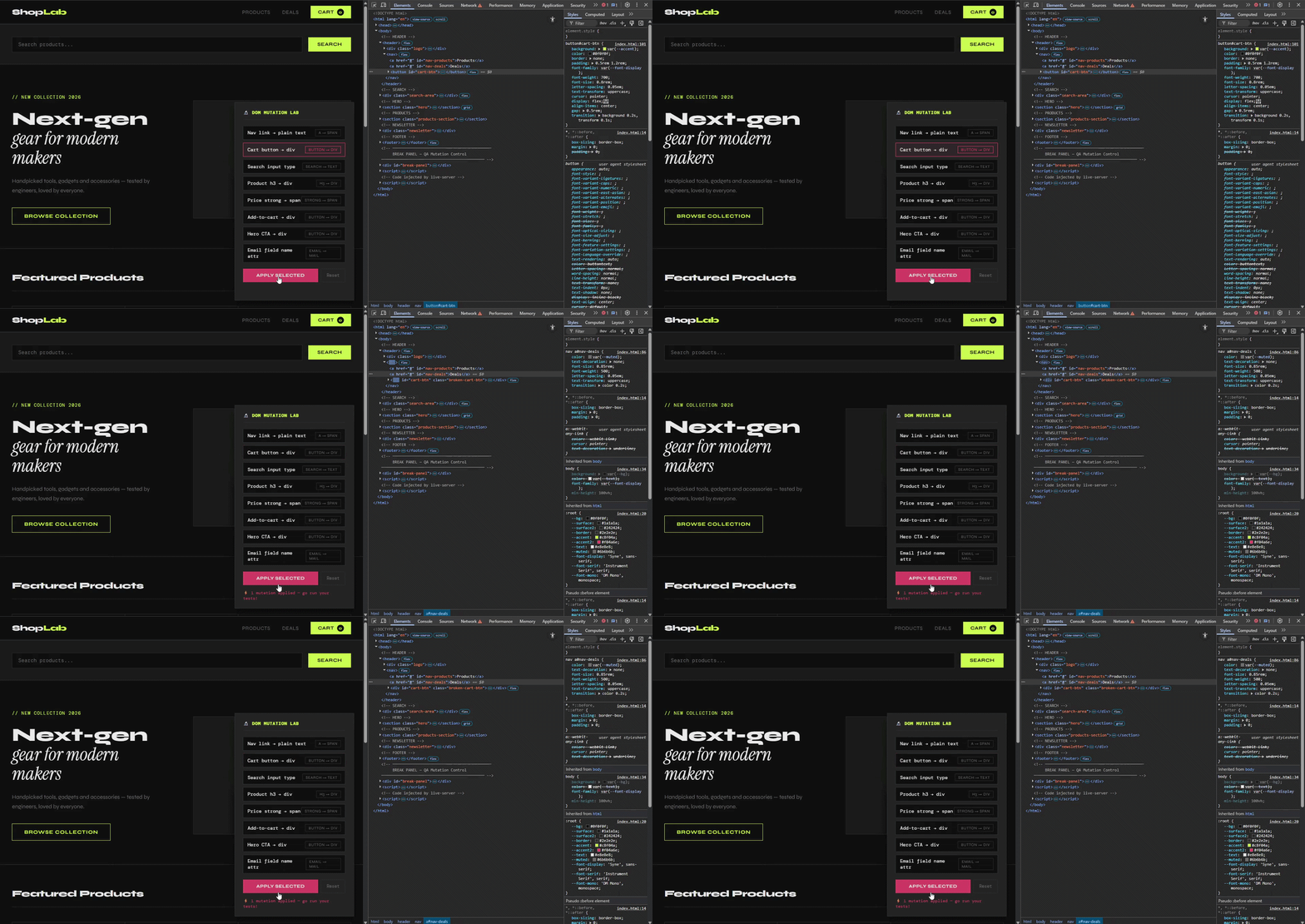
The cart button becomes a div. The tests do not notice.
There is also a Playwright test suite covering the main interactions on the page. All tests pass on the clean version. You can grab both from our GitHub repo and follow along.
The Experiment
Before we break anything, you need two things running: the Playwright test suite and Claude Code with the Playwright MCP server connected.
If you do not have Claude Code installed yet:
npm install -g @anthropic-ai/claude-code
Then register the Playwright MCP server at the user level so it is available across all your projects:
claude mcp add playwright --scope user -- npx @playwright/mcp@latest
Start a Claude Code session in your project folder:
cd your-project-folder
claude
Run /mcp inside the session to confirm the Playwright server is connected. You should see browser_navigate, browser_snapshot and browser_click listed among the available tools. If they are there, Claude has a live browser at its disposal.
Now run the tests against the clean page. Everything passes.
npx playwright test shoplab.spec.ts
Now run them again, this time against the broken version. The BREAK env var tells the spec to open the page with the cart-button-to-div mutation already applied on load — no manual steps needed.
BREAK=cart-button-to-div npx playwright test shoplab.spec.ts
Everything still passes.
This is the moment. A real structural regression just landed in your UI and your entire test suite signed off on it without hesitation.
Now switch to your Claude Code session and run this prompt:
Navigate to file:///your-path/index.html?break=cart-button-to-div Inspect the cart button element. Check its tag type, whether it is in the tab order, its ARIA role, and whether it will respond to keyboard Enter or Space. Tell me if this element behaves like a native button should.Claude navigates to the page, snapshots the DOM and comes back with something your test runner never could:
That single response is the gap made visible.
The Distinction That Matters
There is a line worth drawing clearly here, because this is not an argument for replacing your Playwright suite with an AI that browses your app.
A script runner validates behaviour under controlled synthetic conditions. Given this input, does this output occur. It is deterministic, fast and essential. You should not ship without it.
What Claude adds through Playwright MCP is a different layer entirely. It validates the semantic correctness of your DOM as a real user would experience it. Not whether a click produces a result, but whether the element being clicked is the right kind of thing to be clicking in the first place. Not whether the form submits, but whether a keyboard user could have reached the submit button at all.
One tells you your app works. The other tells you your app is correct. Those are not the same thing, and for too long we have been treating them as if they were.
What To Do About It
The practical takeaway here is not to rewrite your test strategy. It is to add a second pass for a specific class of change.
Run your Playwright suite in CI as you normally would. But on any pull request that touches component markup, whether that is a styling refactor, a design system migration or a framework upgrade, add a Claude MCP semantic audit as a follow up step. Point it at the affected components and ask it to check tag types, ARIA roles, focusability and keyboard behaviour.
A prompt as simple as this is enough to get started:
Navigate to [your page]. For every interactive element, check that it is the correct tag type, is reachable by keyboard, and has the appropriate ARIA role. Flag anything that looks semantically incorrect.You are not replacing coverage. You are covering the part of your UI that scripts have always been blind to.
The Honest Caveat
This workflow is not magic and it is worth being upfront about that.
Claude's output is only as good as the prompt you give it. Vague instructions produce vague results. You will get the most value when you scope the audit tightly to a specific component or user flow rather than pointing it at an entire application and hoping for the best.
It also adds a step to your process. On a fast moving team with short sprint cycles, that friction is real and worth acknowledging. The ROI is highest on components that carry significant user interaction weight, think checkout flows, form submissions, navigation and modals, rather than static content pages where semantic correctness matters less.
And Claude can be wrong. It reasons about the DOM but it is not infallible. Treat its output the same way you would treat feedback from a code review. Informed, useful and worth acting on, but not a rubber stamp.
Used with those expectations in mind, it fills a gap that nothing else in your toolchain currently covers.